


Shopware HTTP Cache: Fast in the Browser, Slow for Google?
- Kategorien:
- Categories:
- Shopware
- Guest article

You open your shop, browse its categories and see pages load quickly. Yet Google Search Console, Google's tool for monitoring your website, shows high response times. This is not necessarily a contradiction: your browser and Google's automated crawler may request different page variants under different conditions.
For an accurate comparison, it is worth taking a closer look at the Shopware HTTP cache. This cache stores completed pages so the shop does not have to generate them again for every request.
For a shop running Shopware 6.4 on the maxcluster platform, we investigated when the cache actually served requests, why Varnish alone was not enough and which checks were needed beyond measuring speed.
The cache and reverse proxy guidance applies to Shopware 6.4 and the linked documentation for that version. For newer versions, check the instructions for your specific release; some settings have changed.
What Search Console actually shows
Under "Settings" and "Crawl stats", you will find "Average response time". The overall view includes different resources, such as HTML documents, images and scripts. For a closer look, you can select the file type "HTML". These values do not measure the time it takes to fully display a page in the browser.
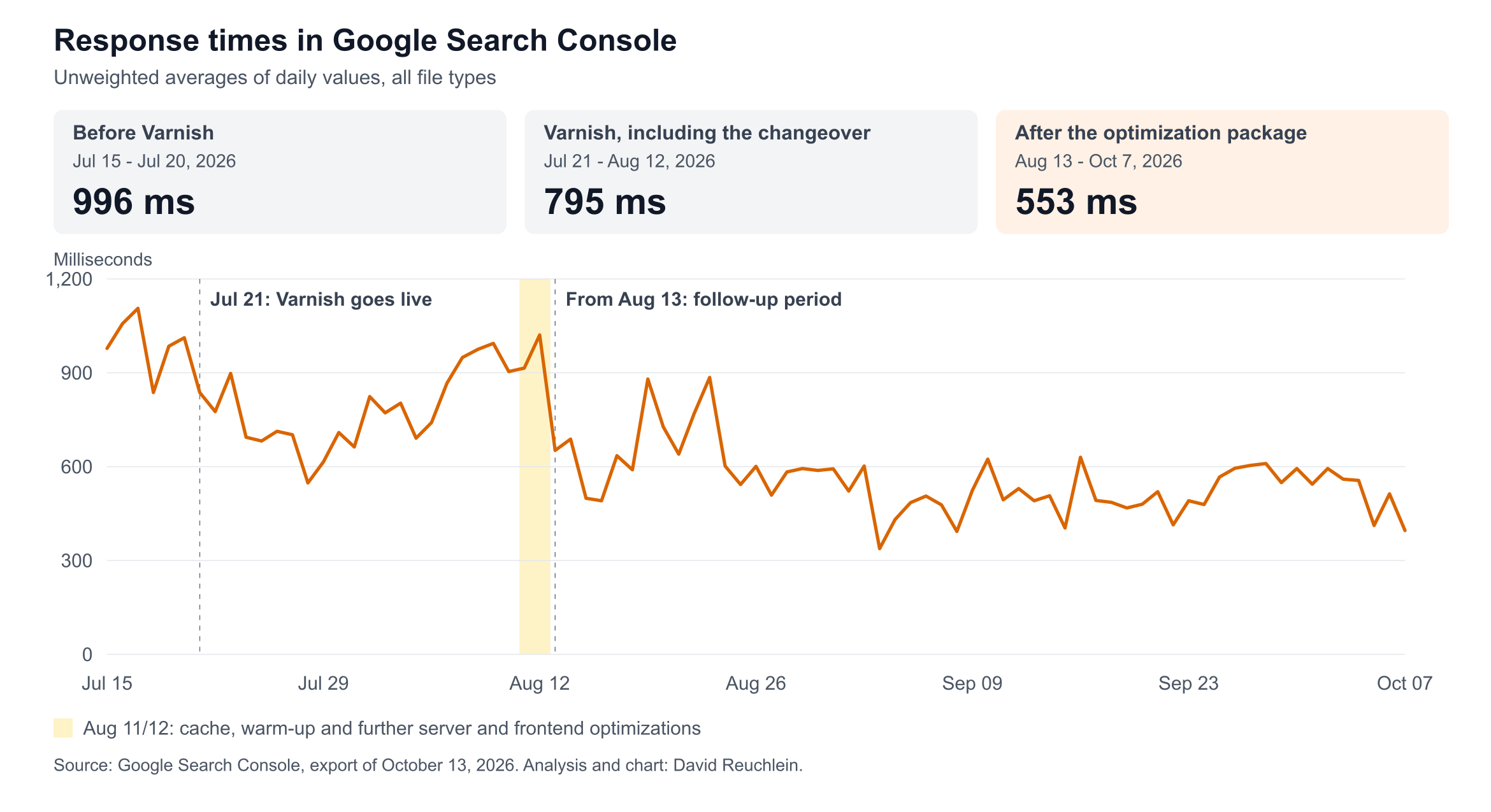
For the shop we investigated, the export shows the following trend:
| Analysis period in 2026 | Project phase | Mean of daily values |
|---|---|---|
| July 15 to July 20 | Before the Varnish launch | 996 ms |
| July 21 to August 12 | Running Varnish, including the later changeover days | 795 ms |
| August 13 to October 7 | After the optimization package | 553 ms |
These figures are rounded, unweighted means of the daily response times across all file types. Each day carries equal weight, regardless of its request count. They therefore describe the trend in daily values rather than the overall average weighted by the number of requests. (Source: Google Search Console, the shop's Crawl stats, export dated October 13, 2026, own analysis)
For your own comparison, keep the same file type and website selection. Also record when you change settings. This lets you check later whether a change in the curve coincides with the changeover or whether you have accidentally compared different subsets of the data. A quick homepage test answers a different question from a trend covering all Google requests.
Slow responses can limit Googlebot's crawl rate. Faster responses can therefore help Google discover product updates sooner, but they do not guarantee faster indexing. Alongside server performance, Google also considers which content it wants to request again.
Why you should also test without cookies
Cookies store information that a browser can send again with later requests. You should not rely on this behavior with Googlebot: Google generally describes it as a crawler without reliable cookie support between page requests. A human visiting for the first time will not have previously stored shop cookies either.
Shopware can still cache responses for visitors without cookies. A missing cookie does not automatically prevent access to the HTTP cache. What matters is the request, its cache variant and the rules of the particular installation.
In Shopware 6.4, the cache cookie sw-cache-hash takes active pricing and business rules, as well as the currency, into account. sw-states identifies states such as "logged in" or "cart contains items"; depending on the route, these can cause the cache to be bypassed. A cache key is the identifier under which a page variant is stored. Different variants must not accidentally receive the same identifier.
For diagnosis, this means comparing requests without cookies against a documented browser state. Lighthouse does not automatically test with existing cookies; the tool can clear site storage before a measurement. Record whether you are testing a first visit or a repeat visit.
Using curl to look for cache hits
The command-line tool curl requests a URL and can display the response headers. Headers are additional information sent with the server's response. Replace the example address with a public product or category page that is accessible without a redirect:
for i in 1 2 3; do
  curl -q -sS --max-time 20 -o /dev/null -D - \
    -A 'Mozilla/5.0 (compatible; Googlebot/2.1; +http://www.google.com/bot.html)' \
    -w '\nstatus %{http_code}\nttfb %{time_starttransfer}s\n' \
    'https://dein-shop.de/kategorie/' \
    | grep -iE '^(HTTP/|age:|cache-control:|x-cache:|status |ttfb )'
  sleep 2
done
The test sends no stored cookies and retrieves the page using GET, the usual request method. -q prevents additional settings from a personal curl configuration file from being applied. TTFB, "Time to First Byte", measures the time from the start of the request to the first byte received, including connection setup. It is not purely the server's processing time.
| Output | Interpretation |
|---|---|
| Status 200 and X-Cache: HIT | A cache configured to provide this header reports a hit for this request. |
| Age greater than 0 | The response already has a reported cache age. |
| Age: 0, missing headers or MISS | Investigate further; this alone does not identify a specific cause. |
| Redirect or error status | Investigate the destination address or the error first. |
Age is expressed in seconds, which is why the requests are separated by pauses. A fresh cache hit can still have Age: 0. X-Cache is a configuration-dependent diagnostic header; its absence does not prove that something is broken.
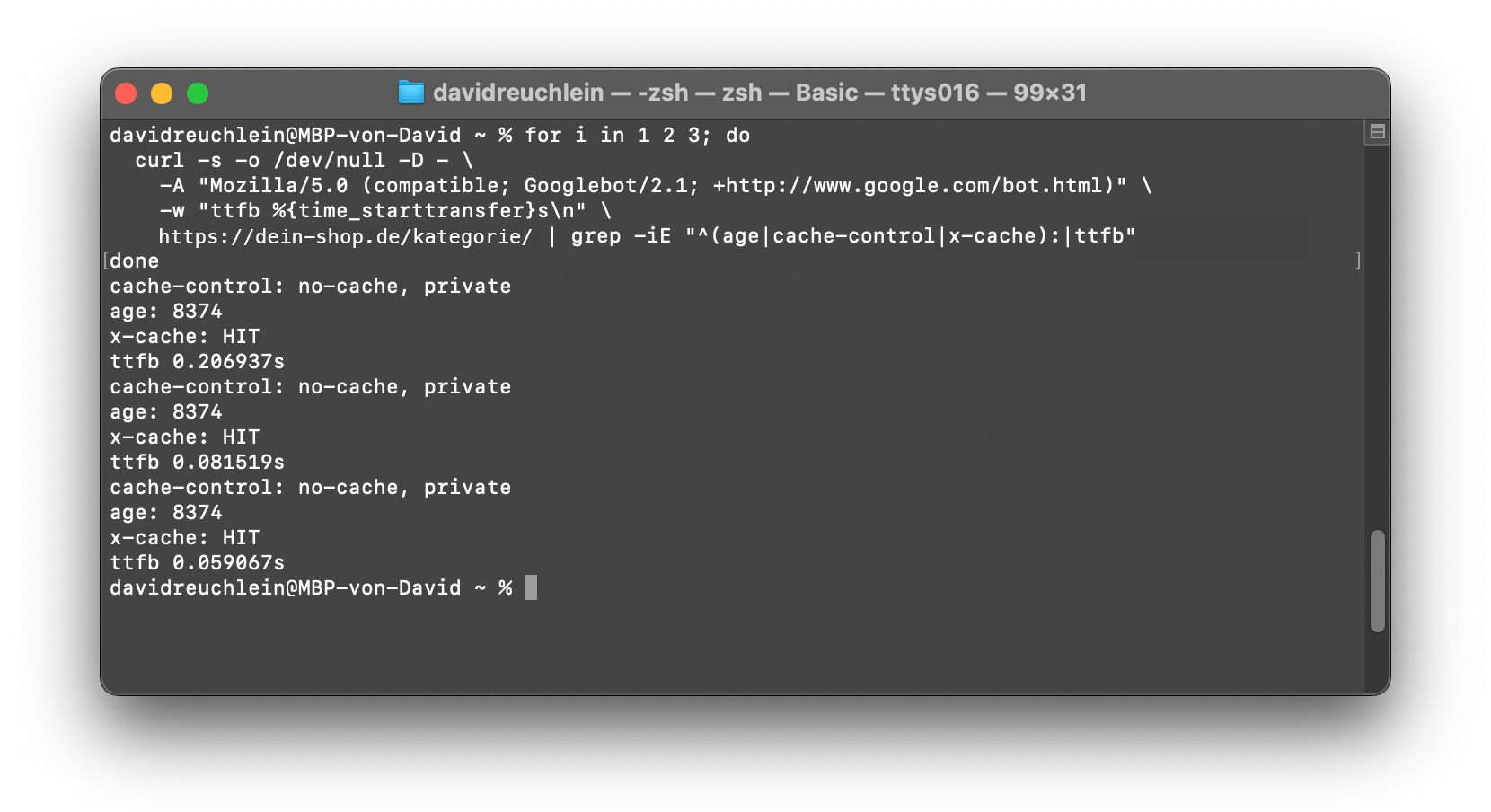
The User-Agent is the client identifier sent with the request. It lets you test rules for that identifier, but does not reproduce Google's source IP address or its entire infrastructure. Repeat the test for several page types and after the cache entry expires.
Alongside the homepage, choose a frequently visited category and a less frequently requested product page. Record the results for each URL separately. If only the homepage reliably produces cache hits, you should not draw conclusions about the entire shop yet. Compare unusual results with the server logs before changing the configuration.
Why Varnish alone was not enough
Varnish is a reverse proxy: it sits in front of the shop and can serve stored pages without running the application again. Its VCL, the Varnish Configuration Language, defines which requests are cached or forwarded. Shopware's sample configuration still takes context cookies into account.
In this project, Varnish went live on July 21. The initial TTL was 180 seconds. TTL stands for "Time to Live" and describes how long a stored entry remains valid. A normal cache hit does not automatically reset this timer. Cached copies of rarely requested product pages could therefore already have expired by the time the next visitor or crawler arrived.
The existing warm-up did not fit this setup: a warm-up pre-fetches pages to populate the cache. The script, which ran every hour, stored cookies and reused them in subsequent requests. According to the project diagnosis, these requests bypassed the intended cache in this configuration. Even with suitable requests, pre-fetching once an hour could not have kept entries with a lifetime of just three minutes continuously fresh.
maxcluster support adjusted the server's cache and runtime settings:
- Varnish TTL: For anonymous pages, the lifetime of a cache entry increased from 180 seconds to four hours. This kept rarely requested pages available in the cache for longer.
- Varnish Grace: Within a 24-hour window, Varnish could continue serving existing expired copies while requesting a new response. This can help mitigate outages or delays, but requires the old copy to still be available.
- MySQL-Buffer-Pool: The InnoDB-Buffer-Pool increased from 128 to 512 MB. This database cache holds frequently used data and index pages in memory so MySQL does not have to reload them from disk on every access.
- PHP-OPcache: The memory allocation increased from 64 to 512 MB. OPcache keeps compiled PHP code in memory so the server does not have to recompile scripts for every request.
At the same time, we adjusted the warm-up script: it no longer sends stored cookies, and we reduced the number of concurrent requests from eight to three. We also optimized images, fonts and scripts.
The original project log dates the server tuning to August 11 and records the overall status as of August 12. These values are project-specific settings, not a universal recommendation for every shop.
From one day to the next, the daily value in Search Console dropped from 1,021 to 652 ms. In the following period, the mean was 553 ms, with individual days ranging from 338 to 885 ms. The decrease followed the entire set of measures: longer cache lifetimes, larger server caches, an adjusted warm-up and frontend optimizations. Since we implemented the changes together, we cannot determine how much each individual measure contributed to the improvement. (Source: Google Search Console, own analysis).
Additional checks when making the change
Expired does not mean deleted
Grace allows an existing expired copy to be served while Varnish requests a new response. After a complete cache clear, or when a URL is requested for the first time, that copy does not exist. The handling of errors during background requests also needs to match the VCL.
Longer cache lifetimes require working invalidation: Shopware must be able to invalidate outdated entries when relevant changes occur. On staging, a separate test environment, check whether changed prices and content reliably become visible. After clearing the entire cache, you need to run a warm-up again.
To do this, request a test page, change a visible piece of content and then request it again without stored cookies. Check not only the status code, but also what is actually displayed. A successful server response does not tell you whether the visitor sees the expected price or a complete product list.
Read response headers at the right point
Cache-Control: no-cache, private does not give a shared cache unrestricted permission to store a response. When delivering a response, however, Varnish can set cache rules that differ from those it received from the shop. Compare the shop's response to Varnish with Varnish's response to the visitor before assuming there is a contradiction.
Test forms in Shopware 6.4
CSRF tokens protect form submissions against forged requests. When using an external cache, Shopware 6.4 requires ajax mode so that matching tokens are requested through JavaScript. In a YAML configuration file, such as config/packages/storefront.yaml, the structure is:
storefront:
  csrf:
    mode: ajax
Custom forms must support the JavaScript integration provided for this purpose. From Shopware 6.5 onward, this setting is removed in favor of protection based on SameSite cookies, which restricts cookies being sent with cross-site requests.
The project notes document 0 to 22 CSRF error entries per day before the Varnish launch, followed by 771 to 1,187 during the period investigated. This did not mean the same number of lost customer requests: some of the affected endpoints also served cookie banner functions. (Source: the shop's Shopware error log, daily counts)
We tested the change on staging in August and deployed it to the production shop in September. However, this caused a problem with card payments: both the payment plugin and Shopware's form handler attached to the checkout form, and the order was submitted before the card details had been saved. For this reason, we rolled back the change after four days.
We quickly identified the cause: the page containing the checkout form is never cached, so a token rendered directly into the form cannot get stuck in the cache there. The solution is therefore to exclude only this form from the JavaScript handler and render its token directly; all other forms continue to fetch their tokens through JavaScript. This is now on staging and will go live in the production shop with the next rollout.
Before making the change, check every plugin that submits its own forms, especially during checkout. After the rollout, monitor payments as well as the error logs: to confirm success, you need both a working submission and the corresponding entries in the server logs.
Your checks before and after the rollout
- Record the baseline: Document the Shopware version, tested URLs, cookie state, metric and time of measurement.
- Check the cache: Compare requests without cookies with repeated browser requests and investigate unusual results in the server logs.
- Test the proxy: Check HTTPS detection and redirects; only accept forwarded information from trusted proxies.
- Check content and forms: Test prices, product lists, the cart, the contact form and every checkout payment method on staging; check error statuses and actual functionality.
- Control the warm-up load: Request public pages from the sitemap, the shop's list of URLs, without stored cookies and adjust concurrency to the available capacity.
- Monitor trends: After the rollout, assess cache hits, response times and errors together; compare Search Console data over a documented follow-up period.
For background information, see maxcluster's articles on Performance and PageSpeed Boosting with Varnish Cache and Performance Optimization for Shopware Shops.
Conclusion
Requests without cookies show you whether your Shopware cache works under conditions that differ from your usual browser visit. In this project, Search Console response times decreased after a set of cache adjustments, a corrected warm-up process and other optimizations. Check cache hits, content freshness and form functionality together before adopting the configuration in your shop.
About the author

David Reuchlein is a freelance software developer from Zellingen near Würzburg, specializing in Shopware, Shopify and technical search engine optimization. As a maxcluster partner, he works on projects including performance optimization for shops in production.
His services for shop operators and agencies include custom plugins and themes, updates and migrations. He also develops integrations with inventory management, accounting and other services.
Find out more at: www.david-reuchlein.de
